 Overbite
Twitter banner size
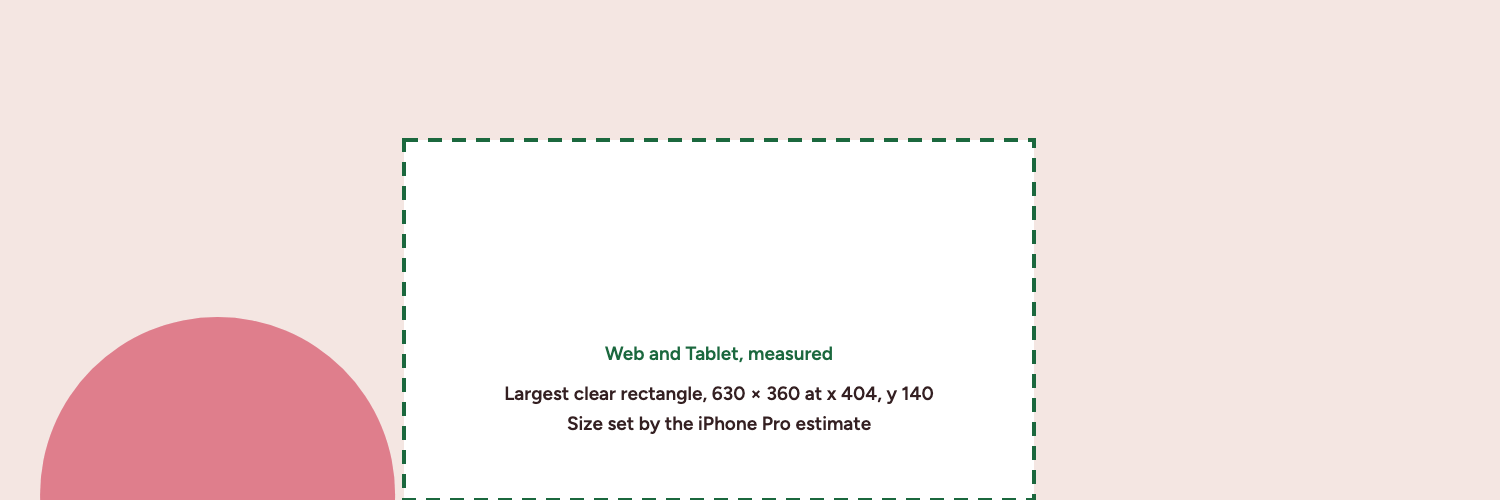
The X (Twitter) banner size is 1500×500 pixels, a 3:1 JPG, GIF or PNG. Put text inside the 630×360 rectangle at x 404, y 140, which an estimated iPhone sets. Measured devices alone allow 647×397. The X app on the iPhone 13 shows about 1250 pixels of the width. Android was not measured.
What size should a Twitter banner be?
Upload your banner at 1500×500 pixels. X recommends that size for the header in its profile help page, and it gives you a 3:1 ratio, three times wider than tall. A Twitter banner, an X banner and an X header all name the same image in the same slot, so the size is the same under each name.
X accepts JPG, GIF and PNG files. It does not support animated GIFs for profile or header images, so a moving banner will not work. The profile photo is a separate upload, and X recommends 400×400 pixels for it.
X warns about cropping even at this size. X says "60 pixels on the top and bottom could be cropped" on different monitor sizes and browsers. Our browser measurements at 1440, 1169, 820 show a full 3:1 box, but plan for X's figure.
| Item | Value |
|---|---|
| Recommended header size | 1500×500 pixels |
| Aspect ratio | 3:1 |
| Accepted formats | JPG, GIF, PNG |
| Animated GIFs | Not supported for profile or header images |
| Header file size | No separate limit published by X |
| Recommended profile photo | 400×400 pixels, 2 MB maximum |
How much of the banner is visible on each device?
On web and tablet you see the whole width. In the X app on iPhone you do not. The table shows the box the banner sits in on screen, in device points, and what that leaves of a 1500 pixel wide image. All five devices keep the full 500 pixel height.
| Device | Banner box on screen | Cut from each side | Visible width | Source |
|---|---|---|---|---|
| Web and tablet | 598×199 | None | 1500 px | Measured, November 2026 |
| iPhone 13 | 390×156 | About 125 px | 1250 px | Measured, November 2026 |
| iPhone Pro, 402×874 screen | 402×171 | About 162 px | About 1175 px | Estimated, iPhone 13 layout rules on this screen |
| iPhone Pro Max, 440×956 screen | 440×171 | About 107 px | About 1287 px | Estimated, iPhone 13 layout rules on this screen |
These numbers describe the X app. Mobile Safari has been observed showing the full 3:1 banner, so the side cut appears to apply only to the app. The iPhone Pro and iPhone Pro Max rows are estimates, with iPhone 13 layout rules applied to those screens. Android was not measured, so the table has no Android row.
Why is the visible width smaller on iPhone?
The X app does not use a 3:1 box, so it scales the banner to fill the height and the sides fall off. On the iPhone 13 that costs about 125 pixels per side. The guide to banners cut off on iPhone has the cause, a quick test and the repair steps.
What file size should a Twitter banner be?
X lists a 2 MB maximum for profile photos in its upload help page. We could not find a separate published file size for the header. Third-party guides disagree, some saying 2 MB and others 5 MB, so we do not state a header limit as fact.
Keep your file under 2 MB and the disagreement stops mattering. That is the conservative target, and it is the point where the Overbite editor warns you and suggests JPEG.
Should you use PNG or JPEG?
Use PNG for banners that are mostly flat color and text, because it keeps hard edges sharp. Use JPEG for banners built on a photo, which is where PNG files grow fastest. If a PNG comes out over 2 MB, export the same design as JPEG and compare.
GIF is accepted too, but it has a limited palette, and X does not support animated GIFs for headers. The editor exports PNG and JPEG only.
Should you export larger than 1500×500?
You can, but it is rarely worth it. The editor exports at 1×, 2× and 3×, and larger exports make larger files, which pushes you toward the 2 MB target. X recommends 1500×500, so start with 1×. We did not test how X compresses uploads, so we cannot promise that a larger file looks sharper after it is processed.
How should you lay out a 1500×500 banner?
Think of the canvas in two parts. Backgrounds, textures and gradients can run to the edges, since nothing is lost if an edge is hidden. Text, logos and faces belong in the 630×360 safe zone, the largest rectangle that stays clear on the five devices mapped here. The iPhone Pro estimate sets that size. On measured devices alone, meaning web, tablet and the iPhone 13, the largest clear rectangle is 647×397 at x 395, y 103. To allow for X's cropping note, that rectangle stops at y 440, leaving 630×300.
How do you upload a banner on X?
These are the steps from X's profile help page.
- Go to your profile.
- Click or tap Edit profile.
- Click or tap the camera icon on the banner, then choose Upload photo.
- Save your changes.
Need a design first? Start from a free banner template. The measurement notes explain where each number in this guide came from.